CAS - Load to CAS
Description
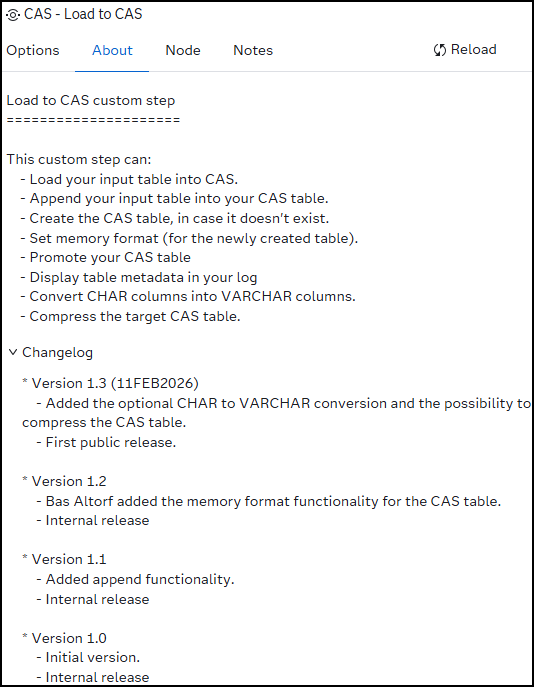
This custom step lets you:
- Load data from the SAS Studio Compute- and/or batch contexts directly into CAS.
- Append your SAS dataset input table into your CAS table.
- Create the CAS table in case it doesn't exist.
- Set the memory format for your newly created table.
- Promote your CAS table.
- Convert one or more CHAR(acter) columns into VARCHAR columns.
- Compress the target CAS table.
- Display CAS table metadata.
Important
Convert CHAR to VARCHAR
Be cautious when using this option. The conversion doesn't always save memory and might degrade performance. Besides the memory needed to store the character value the system needs an additional 16 bytes, for length- and offset information, flag bits and alignment, for each VARCHAR column, for each row.
You can use the following decision table:
| # | Scenario | Choose |
|---|---|---|
| 1 | codes, keys, flags | CHAR |
| 2 | Names, text, comments | VARCHAR (Selectively) |
| 3 | Avg length ≈ length specification | CHAR |
| 4 | Avg length ≪ length specification | VARCHAR |
| 5 | Performance-critical columns | CHAR |
| 6 | Very large CAS tables | VARCHAR (Selectively) |
For more information have a look at CAS datatypes
Note that this functionality is only available for SAS dataset source tables, for now.
You can use the SAS Viya information catalog to determine which columns can/need to be converted, with less memory usage in mind.
Compress CAS table
-
Please be aware that this option exchanges less memory usage for more CPU usage!
-
The compress option only makes sense in case the memory format is 'STANDARD'. The memory format D(uplicate)V(alue)R(eduction) itself is a form of compression. For more information have a look at SAS Viya: CAS & DVR.
Good to know
- When converting a character field to a variable character field, the length stays the same, i.e. CHAR(X) => VARCHAR(X)
- The custom step uses the CASUSER caslib in case there's the need for appending to a existing CAS table and performing a CHAR to VARCHAR conversion.
- When trying to convert columns for a non SAS dataset/table, the conversion is canceled but the table is loaded into CAS.
SAS Viya version support
This custom step is created and tested in Viya 4, Stable 2025.12
User interface
Tab: Options
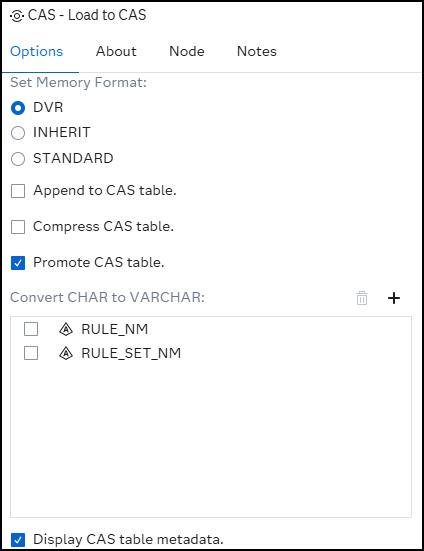
- Set Memory Format: Here you can select one of three options:
| # | Format | Comment |
|---|---|---|
| 1 | DVR | Stands for Duplicate Value Reduction and reduces memory consumption when data contains many duplicates. |
| 2 | INHERIT | CAS selects the format automatically based on session/system settings. This is the default value. |
| 3 | STANDARD | Data is stored as is, with no special compression. Note that the compress option can be used in this case. |
- Append to CAS table: This option lets you add/append rows to the existing CAS target table. In case the CAS table doesn't exist, it will create it for you.
- Compress CAS table: Use this option if you want to use standard compression, not the DVR memory format, for the specified CAS table. Note that this option exchanges less memory usage for more CPU usage. For more information see: Data Compression
- Promote CAS table: With this option you can give the CAS table a global scope and make it available to everyone.
- Convert CHAR to VARCHAR: Here you can select one or more columns that need to be converted from CHAR to VARCHAR. It does so while loading the source dataset into CAS. Note that the custom step will only perform this action for SAS datasets.
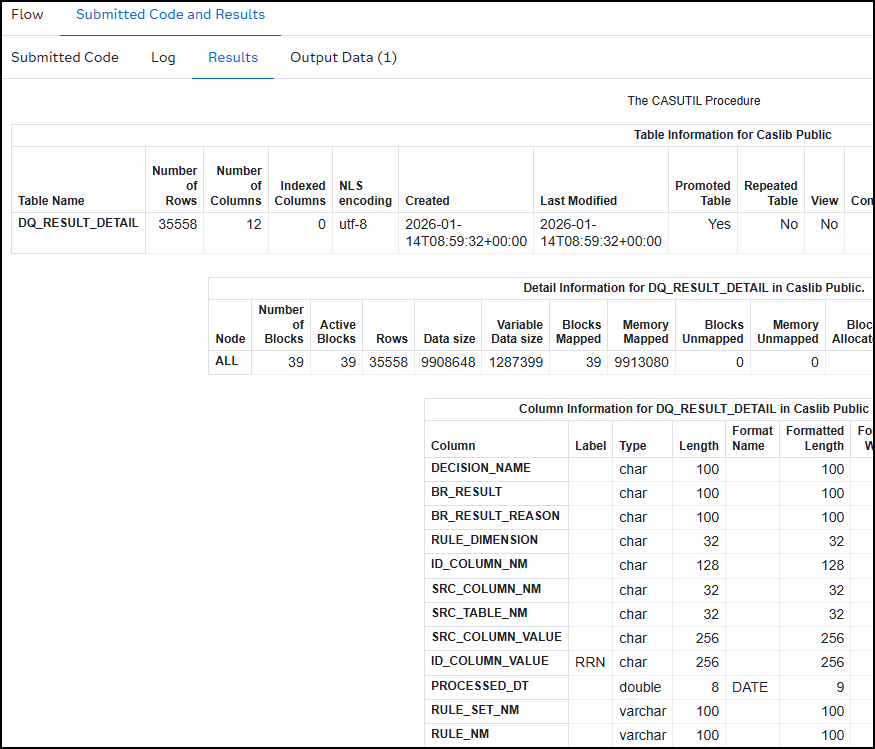
- Display CAS table metadata: This results in a detailed description of the CAS target table on the results tab:
Tab: About
Usage
Download the .step file, upload it into your environment and start using it.
Example flow:
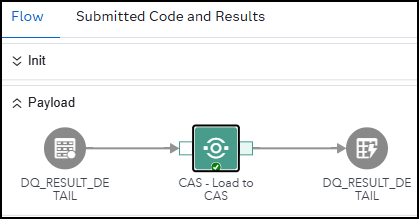
Note that:
- The target CAS table doesn't need to, physically, exist.
- The custom steps checks if the target table is CAS table.
- It will raise an error in case the target table isn't a CAS table.
- In case the target table isn't a CAS table, the functional part of this step will not be run.
- The conversion from CHAR to VARCHAR is, for now, only supported for SAS Dataset source tables.
- The source- and target libraries are taken from the source- and target tables themselves.
Custom step messages
| # | Step message | Reason | Result |
|---|---|---|---|
| 1 | ERROR: The source table &_input does not exist. Aborting process. | The specified physical source table doesn't exist. | The custom steps aborts and nothing is loaded into CAS. |
| 2 | ERROR: The target table is not a CAS table. | The user of the custom step has selected a non CAS table | Functionally nothing happened. |
| 3 | WARNING: Conversion to VARCHAR is canceled because of incompatible source table engine. | The user tries to load or append a source table, with columns to convert, into CAS that is not a SAS Dataset. | Nothing is converted but the step tries to load/append the table as-is. |
Change log
Version 1.3 (11FEB2026):
- Added the optional CHAR to VARCHAR conversion and the possibility to compress the CAS table.
- First public release
Version 1.2:
- Bas Altorf added the memory format functionality for the CAS table.
- Internal release
Version 1.1:
- Added append functionality.
- Internal release
Version 1.0:
- Initial version.
- Internal release